

What is the Tech Lending Library?
Hayward residents age eighteen or over (18+) who lack a computing device can use their Hayward Public Library card to check-out a Lenovo Chromebook by filling out a Tech Lending Form. Devices must be connected to an external WiFi source (not provided) to connect to the Internet.
Questions?
Call the Information Desk at (510)881-7980 or chat with us online.
Checked Out a New Device?
We're here to help!
- View our Tech Lending Guides below, including FAQs and Quick-start guides.
- Get 1-on-1 Tutor Support for your HPL Tech Lending Library Device.
- Reach out to us at EdServices@hayward-ca.gov or (510) 583-8557.
1-on-1 Tutor Support

Get 1-on-1 tutoring support for devices from our Tech Lending Library. Learn more and make an appointment from our Tech Tutoring page.
What's Available?
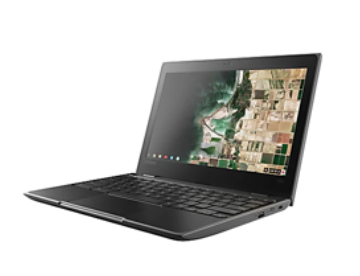 Lenovo 100e (Gen 3) LTE Chromebook: Chromebooks are portable computers that are Wi-Fi enabled. Devices must be connected to an external WiFi source (not provided) to connect to the Internet. You can use a Chromebook to do almost anything you’d normally do online: read websites, check email, watch online videos, and so on. Chromebooks are cloud-based, meaning the device uses the internet to run its programs.
Tech Lending Forms
- Tech Lending Form
- Biblioteca de Prestamos de Tecnología Póliza y Acuerdo del Prestatario
- 电子设备租借图书馆 出借规则及同意书